- Home Page /
- Electronics /
- Computer Accessories /
- Computer Accessories & Peripherals /
- Input Devices /
- Touch Pads /
- Wireless Trackpad Multi-Touch Surface touchpa...
0 ratings

Item #:
220056114
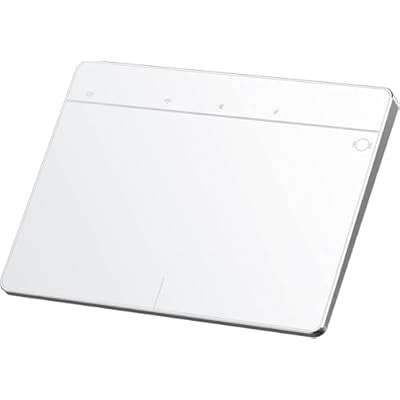
Wireless Trackpad Multi-Touch Surface touchpad for Windows1011 DesktopLaptopNotebook Computer PC MG3 White
Item #:
220056114
LKR 21338
Price Details
Excluding Shipping & Custom charges ( Shipping and custom charges will be calculated on checkout )
*All items will import from US
0 ratings
Write a review
In stock
 Imported from USA store
QTY:
Order now and get it around Wednesday, July 01
Secured transaction
Ubuy works hard to protect your security and privacy. Our advanced payment security system ensures confidentiality by encrypting your information during transmission using AES (Advanced Encryption Standards) and SSL (Secure Socket Layer) protocols. Your payment details are 100% secure as we do not share your payment details with third party sellers.
Our Top Logistics Partners


Enjoy effortless navigation with style and ease that seamlessly integrates into your workspace.

Fast
Shipping

Free
Return*

Secure Packaging

100% Original Products

PCI DSS Compliance

ISO 27001 Certified


Note: Step Down Voltage Transformer required for using electronics products of US store (110-120). Recommended power converters Buy Now.


What Stands Out
Tempered Glass Surface
The durable tempered glass surface offers a smooth and responsive experience, enhancing tactile feedback while ensuring longevity and resistance to scratches.
Multi-Touch Functionality
With advanced multi-touch support, users can navigate effortlessly through gestures, providing an intuitive user experience that boosts productivity on Windows devices.
Rechargeable Slim Design
The slim, rechargeable design not only saves desk space but also eliminates the need for disposable batteries, making it a more sustainable and eco-friendly choice.
Product Details
Who Should Buy?

-
Graphic Designers
Offers high precision navigation and multi-touch gestures, essential for creative design applications and finer control.
-
Tech Enthusiasts
Ideal for users who appreciate modern devices and enjoy using wireless, sleek technology for improved desktop experience.
-
Minimalist Users
Perfect for those seeking a clutter-free workspace as its slim design complements minimalistic setups without sacrificing functionality.

-
Gaming Enthusiasts
May lack the necessary precision and quick response times required for high-level gaming performance compared to traditional mice.
-
Mobile Professionals
Not portable enough for frequent travelers who prefer compact devices, as it is designed primarily for stationary use.
-
Budget Shoppers
Could be considered overpriced by users looking for basic functionality without the added features of trackpads in this range.
Product Description
Wireless Trackpad Multi-Touch Surface touchpad for Windows1011 DesktopLaptopNotebook Computer PC MG3 White
Have any Query? Chat with us
Customer Questions & Answers
-
Question:
What devices are compatible with the Wireless Trackpad?
Answer: The Wireless Trackpad is primarily designed to be compatible with Windows 8 and 10 devices. Its USB interface allows for easy connection, ensuring that laptops and desktops that run these Windows versions can interface seamlessly. Furthermore, as it utilizes a standard driver, it can work well with many third-party applications and software designed for Windows interfaces. For instance, if you're using a Windows laptop for graphic design, the trackpad's high precision can enhance your workflow significantly. -
Question:
How do I charge the Wireless Trackpad?
Answer: Charging the Wireless Trackpad is straightforward, as it comes with a rechargeable battery that connects via a USB cable. Simply plug it into a USB port on your computer or a compatible charger. Typically, a full charge can provide several hours of wireless use, making it perfect for extended productivity sessions. For example, if you're working late at the office, a quick charge can get you back to using the trackpad in no time. -
Question:
Does the Wireless Trackpad support multi-touch gestures?
Answer: Yes, the Wireless Trackpad supports multi-touch gestures, allowing for a more intuitive and efficient navigation experience. Users can perform actions such as pinch-to-zoom, swipe for scrolling, and tap-to-click with ease. This feature is particularly beneficial for those who prefer a touch-centric workflow, like graphic designers or anyone who regularly manipulates images or documents on their devices. Utilizing these gestures can significantly enhance user experience. -
Question:
Is the surface of the Wireless Trackpad resistant to scratches?
Answer: Yes, the Wireless Trackpad features a tempered glass surface that is designed to be resistant to scratches and wear. This ensures that the trackpad remains smooth and functional over time, even with frequent use. Whether you're working in a busy office or at home, this durability can provide peace of mind, especially for users who value aesthetics and functionality equally in their devices. -
Question:
What is the response time of the Wireless Trackpad?
Answer: The Wireless Trackpad is engineered for high precision, featuring a fast response time that minimizes lag during use. This is vital for tasks that require accuracy, such as gaming or graphic design. Users can expect seamless navigation and interaction, making it an optimal choice for multi-tasking environments. Whether you're switching between applications or editing high-resolution images, the responsive performance won't hinder your productivity. -
Question:
Can I use the Wireless Trackpad for gaming?
Answer: While the Wireless Trackpad is not specifically designed for gaming, its high precision navigation can still make it suitable for casual gaming experiences. For instance, games that rely on strategy or precision can benefit from the accurate control the trackpad provides. However, for more intense gaming sessions, a traditional mouse may offer advantages such as faster response and dedicated buttons. -
Question:
How portable is the Wireless Trackpad?
Answer: The Wireless Trackpad is designed to be slim and lightweight, making it highly portable. It can easily fit into a laptop bag or be carried around without adding significant bulk. This portability is ideal for individuals who travel frequently for work or school. For example, if you're a student moving between classes, this trackpad can provide a great touch interface without the hassle of dealing with cords. -
Question:
What are the key features of the Wireless Trackpad?
Answer: Key features of the Wireless Trackpad include a slim design, tempered glass surface, multi-touch functionality, and high precision navigation. Its rechargeable battery adds convenience, eliminating the need for constant replacement. These features make it suitable for both professional and casual use, catering to users who require efficiency and style in their tech accessories. Whether in creative industries or business settings, these specifications support productivity. -
Question:
How does the Wireless Trackpad compare to a traditional mouse?
Answer: The Wireless Trackpad offers a different user experience compared to a traditional mouse. While a mouse provides precise control for tasks like gaming or graphic design, the trackpad allows for seamless multi-touch gestures and a more fluid navigation experience. This can be advantageous in creative scenarios where gesture support is beneficial. For users who multitask frequently, the trackpad's gestures can enhance workflow efficiency. -
Question:
Where can I buy the Wireless Trackpad?
Answer: You can purchase the Wireless Trackpad from Ubuy, Sri Lanka's online marketplace renowned for its wide selection of tech gadgets. Ubuy offers convenient delivery options and a user-friendly shopping experience, making it your go-to platform for acquiring quality electronic devices like this wireless trackpad.
LuolaProject Touch Pads Editorial Review
No editorial reviews found
Customer Reviews & Ratings
1 customers ratings
-
5 Star
100%
-
4 Star
0%
-
3 Star
0%
-
2 Star
0%
-
1 Star
0%
Review this product
Share your thoughts with other customers
Pros
- Responsive multi-touch features
- Sleek and modern design
- Easy to recharge
- High precision navigation
- Compatible with Windows 10/11
Cons
- Limited customization options.
Product Price History
Important information
- Limitations : For products shipped internationally, please note that any manufacturer warranty may not be valid; manufacturer service options may not be available; product manuals, instructions, and safety warnings may not be in destination country languages; the products (and accompanying materials) may not be designed in accordance with destination country standards, specifications, and labeling requirements; and the products may not conform to destination country voltage and other electrical standards (requiring use of an adapter or converter if appropriate). The recipient is responsible for assuring that the product can be lawfully imported to the destination country. When ordering from Ubuy or its affiliates, the recipient is the importer of record and must comply with all laws and regulations of the destination country.
- Not all the products listed on Ubuy are for sale, as Ubuy is a global search engine. Products are subject to export/trade regulations.
LKR 21338
Order now and get it around Wednesday, July 01
This item is not restrict in my country.(Please click on above link if this item is not restrict in your country, So our team will review and allow.)
QTY:
Secured transaction
Ubuy works hard to protect your security and privacy. Our advanced payment security system ensures confidentiality by encrypting your information during transmission using AES (Advanced Encryption Standards) and SSL (Secure Socket Layer) protocols. Your payment details are 100% secure as we do not share your payment details with third party sellers.
Our Top Logistics Partners
Fastest cross-border delivery
Features & Benefits
- Tempered glass surface ensures smooth and comfortable navigation.
- No physical buttons design allows for perfect text selection and file dragging.
- Full-size trackpad supports multi-touch controls with up to 5 finger gestures.
- Plug and play functionality with stable USB-C, Bluetooth, and 2.4g wireless connectivity.
- Wide compatibility with Windows 8, 10, and 11, supporting various touch gestures.
- Sturdy ABS base with anti-slip pads provides added stability.