0 ratings




Item #:
78784761
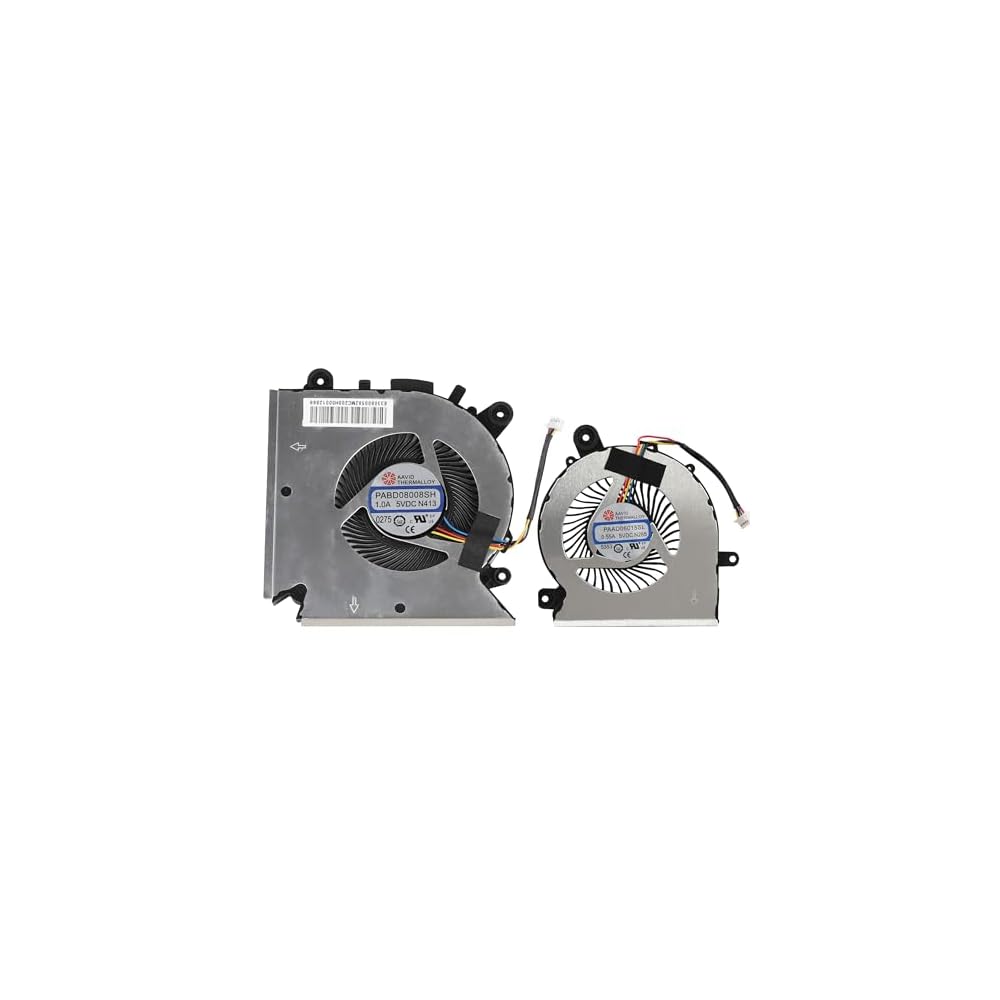
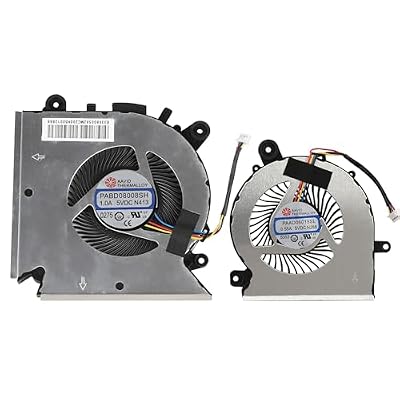
CPU+GPU Cooling Fan for MSI GF63 GF65 Thin MS-16R1 MS-16R3 MS-16R5, WF65 MS-16W1 MS-16W2 P/N: PABD08008SH PAAD06015SL N413 N433 N285
Item #:
78784761
LKR 11997
Price Details
Excluding Shipping & Custom charges ( Shipping and custom charges will be calculated on checkout )
*All items will import from US
4%
0 ratings
Write a review
In stock
 Imported from USA store
QTY:
Only 15 items left in stock.
Order now and get it around Wednesday, June 24
Secured transaction
Ubuy works hard to protect your security and privacy. Our advanced payment security system ensures confidentiality by encrypting your information during transmission using AES (Advanced Encryption Standards) and SSL (Secure Socket Layer) protocols. Your payment details are 100% secure as we do not share your payment details with third party sellers.
Our Top Logistics Partners


Fan defective or noise, free replacement.

Fast
Shipping

Free
Return*

Secure Packaging

100% Original Products

PCI DSS Compliance

ISO 27001 Certified


Note: Step Down Voltage Transformer required for using electronics products of US store (110-120). Recommended power converters Buy Now.


What Stands Out
Enhanced Dual Cooling
Equipped with both CPU and GPU cooling capabilities, this fan ensures optimal thermal performance, preventing overheating during intense gaming sessions and extending the laptop's lifespan.
Perfect Compatibility
Designed specifically for MSI GF63 and GF65 models, this cooling fan guarantees a seamless fit and function, making installation straightforward and hassle-free for users.
Quiet Operation
Unlike standard cooling fans, this model operates quietly, significantly reducing noise levels while maintaining efficient cooling, ideal for gamers and professionals needing a distraction-free environment.
Product Details
- Fit Models : New CPU+GPU Cooling Fan for MSI GF63 GF65 Thin MS-16R1 MS-16R3 MS-16R5, WF65 MS-16W1 MS-16W2 Series laptop
- Fit For: PABD08008SH PAAD06015SL N413 N433 N285
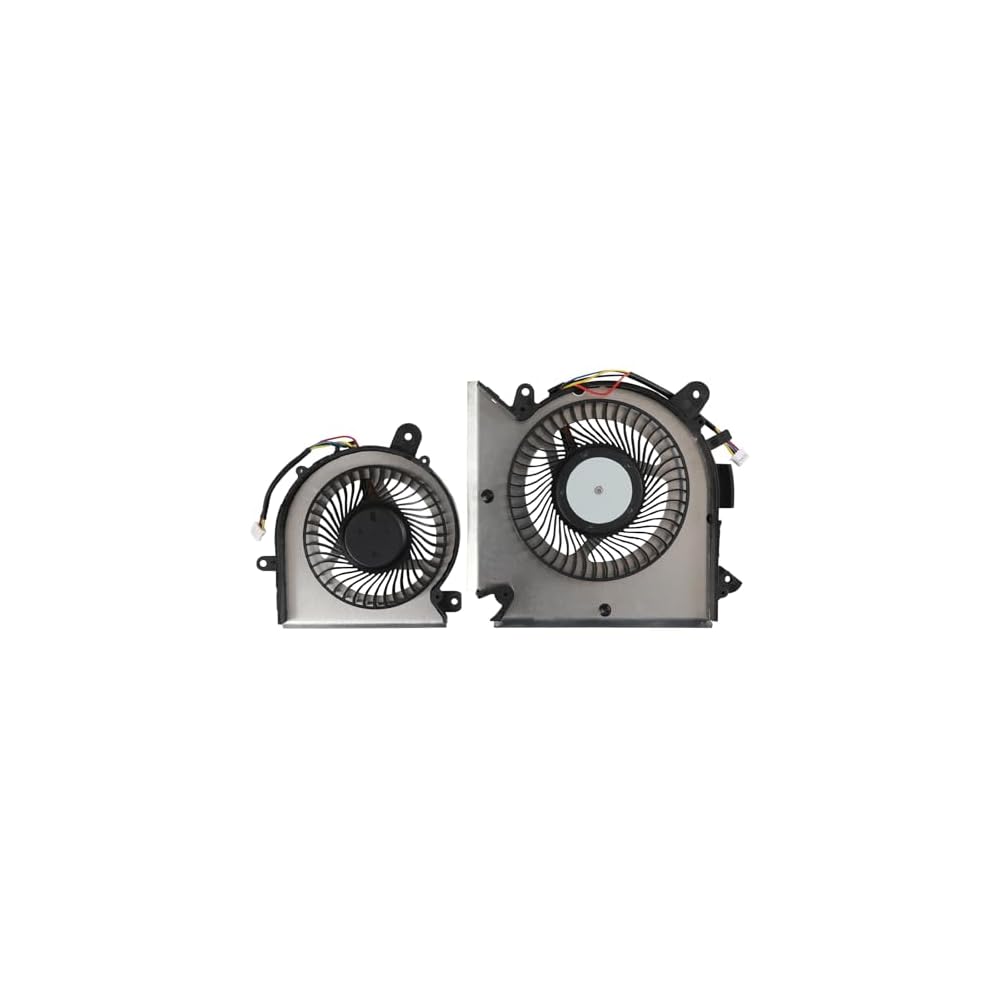
- You will receive: 2× Cooling Fans, Fan defective or noise, free replacement.
- Replacement new CPU+GPU cooling fan will allow you to use the laptop to run stably and comfortably, fast cooling, low noise, create a noise-free & interference-free environment for you.
- Please check the compatible models before purchasing, carefully check the displayed picture and fan code to make sure it is the same as your needs. If you have any questions, please feel free to contact us, Thank you very much!
| Power Connector Type | 4-Pin |
| Voltage | 5 Volts (DC) |
| Wattage | 3 watts |
| Cooling Method | forced air |
| Compatible Devices | Laptop |
| Noise Level | 20 Decibels |
| Maximum Rotational Speed | 3500 RPM |
| Material Type | Metal, Plastic |
| Brand Name | YAEHUYING |
| Manufacturer | YAEHUYING |
| Number of Items | 2 |
| Model | MSIGF65FAN |
| Part Number | MSIGF65FAN |
| Included Components | 2× Cooling Fans |
| Unit Count | 1.0 Count |
| Brand | YAEHUYING |
| Material | Metal, Plastic |
| Item Weight | 0.5 lbs (230 grams) |
Who Should Buy?

-
Gamers
Ideal for gamers who need optimal cooling performance to maintain high frame rates during intense gaming sessions.
-
Overclockers
Perfect for overclockers who push their hardware beyond limits and require effective cooling to prevent thermal throttling.
-
Frequent Laptop Users
Great for users who use their laptops extensively, ensuring prolonged performance and avoiding overheating issues during use.

-
Casual Users
Casual users with regular usage may find standard cooling adequate, making this product unnecessary for their needs.
-
Budget-Conscious Buyers
Not suitable for those on a tight budget as replacements can add unexpected expenses to laptop maintenance costs.
-
Non-Gaming Laptops
This product may not be ideal for non-gaming laptops which do not demand high performance or cooling solutions.
Product Description
About This Item
Keep your MSI GF65, GF65 Thin MS-16W1, and GF65 Thin MS-16W2 running efficiently with the CPUGPU Cooling Fan. Designed specifically for these models, this cooling fan is the ideal solution for preventing overheating and maintaining optimal performance. With the PN: PABD08008SH N413 and PAAD06015SL N433, this cooling fan is a perfect replacement for your old or damaged one. It is easy to install, ensuring a hassle-free experience. Featuring a high-quality construction, this cooling fan is built to last.
It effectively dissipates heat from your CPU and GPU, allowing for smooth operation even during intense gaming sessions or resource-heavy tasks. Not only does this cooling fan prevent overheating, but it also helps reduce noise levels. Its efficient operation ensures that your device remains silent, even during demanding use. Invest in the CPUGPU Cooling Fan for MSI GF65, GF65 Thin MS-16W1, and GF65 Thin MS-16W2, and enjoy prolonged device lifespan and superior performance. Don't let overheating slow you down - keep your laptop cool and functioning at its best with this reliable and effective cooling fan.
Have any Query? Chat with us
Customer Questions & Answers
-
Question:
What are the compatibility details for the CPUGPU Cooling Fan for MSI GF63 GF65?
Answer: The CPUGPU Cooling Fan is specifically designed for several MSI laptop models, including GF63, GF65 Thin, MS-16R1, MS-16R3, MS-16R5, WF65, MS-16W1, and MS-16W2. It offers precise fitment and optimal cooling efficiency for these particular systems. Being a crucial component, it helps ensure that your laptop’s CPU and GPU remain cool during demanding tasks such as gaming or video editing. Always check your current fan model against the part numbers: PABD08008SH, PAAD06015SL, N413, N433, and N285 for correct matching. -
Question:
How do I install the CPUGPU Cooling Fan for MSI GF63 GF65?
Answer: To install the CPUGPU Cooling Fan, you will need basic tools like a screwdriver and a static wrist strap for safety. Begin by disconnecting your laptop from power and removing the battery if applicable. Open the laptop casing carefully, locate the cooling fan assembly, and disconnect any cables. Remove the old fan and replace it with the new one, ensuring all connections are secure. This installation improves airflow and cooling performance, essential for maintaining the efficiency of high-performance laptops under load. -
Question:
What symptoms indicate that I need to replace my cooling fan?
Answer: If your laptop experiences overheating, frequent crashes, or loud noises emanating from the fan, these are indicators that your cooling fan may be failing. You might also find that the laptop performance suffers during gaming or intensive workloads, suggesting inadequate cooling. Regular maintenance checks can prevent such issues by ensuring consistent airflow and component temperature management, prolonging the overall lifespan and efficiency of your device. -
Question:
Where can I purchase the CPUGPU Cooling Fan for MSI GF63 GF65 in Sri Lanka?
Answer: You can buy the CPUGPU Cooling Fan for MSI GF63 GF65 through Ubuy in Sri Lanka. They offer a user-friendly platform to find a variety of cooling fans compatible with your MSI laptops. Ubuy is known for its wide selection of tech products, making it easy for buyers to find the exact parts needed for repairs or upgrades. Contrast prices and reviews to choose the option that best fits your needs. -
Question:
Is it possible to clean my existing cooling fan instead of replacing it?
Answer: Cleaning your existing cooling fan can indeed rejuvenate its performance. Dust buildup can lead to overheating, so regular cleaning is advised. Use compressed air to blow out dust and debris from the fan blades and vents. This method is effective for maintaining airflow efficiency and preventing thermal throttling while prolonging the lifespan of your device. Regular maintenance can keep your laptop running smoothly without the need for frequent replacements. -
Question:
What should I look for when choosing a replacement cooling fan?
Answer: When selecting a replacement cooling fan, ensure it matches the specifications of your model, including voltage, size, and connector type. Look for fans with robust materials that promote durability and find one that has a good airflow rating for efficient cooling. Checking reviews for performance and noise levels can also guide you in choosing a fan that provides optimum cooling without being overly noisy, enhancing your laptop usage experience. -
Question:
Can a faulty cooling fan affect my laptop’s performance?
Answer: Absolutely, a faulty cooling fan can lead to increased temperatures, causing your laptop to throttle processing speeds to prevent damage. This can hinder performance in gaming, heavy multitasking, or demanding applications. Regulating temperatures is essential for optimal performance; hence a functional cooling fan plays a critical role in maintaining performance levels and component longevity. Addressing fan issues promptly can mitigate the risk of permanent damage. -
Question:
What are the benefits of replacing my cooling fan?
Answer: Replacing your cooling fan can significantly enhance your laptop's thermal management, preventing overheating during use. A new fan can restore operational efficiency, decrease the risk of hardware failure, and improve overall system performance. This is particularly beneficial during high-demand applications like gaming or rendering, where overheating is common. An efficient cooling solution not only extends the life of your laptop but also ensures stutter-free operation during intensive tasks. -
Question:
How often should I replace my laptop cooling fan?
Answer: The frequency of cooling fan replacement can depend on various factors including usage, environment, and maintenance. Typically, fans may last several years but should be checked for dust and function regularly. If you notice decreased performance, increased noise, or overheating issues, it may be time for a replacement. Keeping track of your laptop’s temperature and performance can help inform timely replacements, ensuring optimal functionality and longevity. -
Question:
Are there any specific maintenance tips for laptop cooling fans?
Answer: Regular maintenance for laptop cooling fans includes cleaning them periodically to prevent dust buildup, which can impede airflow and cooling efficiency. Ensure that the fan vents are unobstructed and the laptop is kept in a cool, dry area. Not subjecting the laptop to extreme temperatures can further preserve fan efficiency. Additionally, monitoring your laptop's temperature with software tools can help you determine when maintenance is due, ensuring it remains in optimal working condition.
YAEHUYING CPU Cooling Fans Editorial Review


No editorial reviews found
Customer Reviews & Ratings
10 customers ratings
-
5 Star
33%
-
4 Star
19%
-
3 Star
16%
-
2 Star
0%
-
1 Star
32%
Review this product
Share your thoughts with other customers
Pros
- Efficient cooling
- Quiet operation
- Easy installation
- Compatible models
- Durable build
Cons
- Minor noise at high speed
Product Price History
Important information
- Limitations : For products shipped internationally, please note that any manufacturer warranty may not be valid; manufacturer service options may not be available; product manuals, instructions, and safety warnings may not be in destination country languages; the products (and accompanying materials) may not be designed in accordance with destination country standards, specifications, and labeling requirements; and the products may not conform to destination country voltage and other electrical standards (requiring use of an adapter or converter if appropriate). The recipient is responsible for assuring that the product can be lawfully imported to the destination country. When ordering from Ubuy or its affiliates, the recipient is the importer of record and must comply with all laws and regulations of the destination country.
- Not all the products listed on Ubuy are for sale, as Ubuy is a global search engine. Products are subject to export/trade regulations.
LKR 11997
Order now and get it around Wednesday, June 24
This item is not restrict in my country.(Please click on above link if this item is not restrict in your country, So our team will review and allow.)
QTY:
Only 15 items left in stock.
Secured transaction
Ubuy works hard to protect your security and privacy. Our advanced payment security system ensures confidentiality by encrypting your information during transmission using AES (Advanced Encryption Standards) and SSL (Secure Socket Layer) protocols. Your payment details are 100% secure as we do not share your payment details with third party sellers.
Our Top Logistics Partners
Fastest cross-border delivery
Features & Benefits
- CPU+GPU Cooling Fan for MSI GF65, GF65 Thin (MS-16W1 MS-16W2)
- Compatible with P/N: PABD08008SH N413, PAAD06015SL N433
- You will receive: 2× Cooling Fans
- Warranty: 12 months
- Free replacement for defective or noisy fans