- Home Page /
- Electronics /
- Computer Accessories /
- Computer Data Storage Devices /
- Floppy & Tape Drives /
- Floppy Drive Emulator 3.5 Inch 1.44MB USB Flo...
0 ratings




Item #:
9018292
Floppy Drive Emulator 3.5 Inch 1.44MB USB Floppy Emulator SFR1M44 U100K Updated Flash Disk Floppy Drive Replacement Black
Item #:
9018292
LKR 16643
Price Details
Excluding Shipping & Custom charges ( Shipping and custom charges will be calculated on checkout )
*All items will import from US
0 ratings
Write a review
In stock
 Imported from USA store
QTY:
Only 14 items left in stock.
Order now and get it around Thursday, June 25
Secured transaction
Ubuy works hard to protect your security and privacy. Our advanced payment security system ensures confidentiality by encrypting your information during transmission using AES (Advanced Encryption Standards) and SSL (Secure Socket Layer) protocols. Your payment details are 100% secure as we do not share your payment details with third party sellers.
Our Top Logistics Partners


GOTOTOP Floppy & Tape Drives-3.5” 1.44MB Sfr1m44-u100k Updated Version USB Flash Disk Floppy Drive Emulator + CD Screws Black

Fast
Shipping

Free
Return*

Secure Packaging

100% Original Products

PCI DSS Compliance

ISO 27001 Certified


Note: Step Down Voltage Transformer required for using electronics products of US store (110-120). Recommended power converters Buy Now.


What Stands Out
Seamless Compatibility
Designed for easy integration, this emulator mimics 3.5-inch floppy drives, allowing smooth operation with vintage systems and modern computers alike, catering to enthusiasts and professionals who need reliable data transfer.
High Capacity
With a 1.44MB storage capacity, it offers ample space for nostalgic data storage and retrieval, ensuring users can access essential files that traditional floppy disks often struggle to maintain.
User-Friendly Design
The compact and straightforward design allows for effortless installation and usage, making it ideal for users of any technical level looking to preserve and access old data without hassle.
Product Details
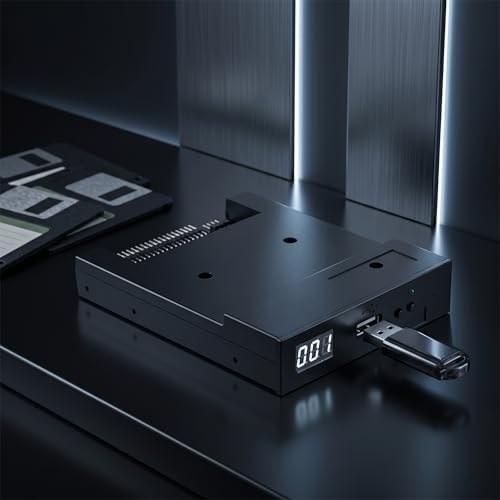
- Floppy Drive Emulator: This emulator lets you use a standard USB flash drive as a virtual floppy disk. It is designed for 3.5 inch 1.44MB floppy drive systems. Perfect for CNC machines, industrial equipment, and vintage computers.
- Easy USB Emulator: No extra driver is needed. The device draws power directly from the USB port. Simply plug in a USB drive and your system will recognize it as a floppy disk.
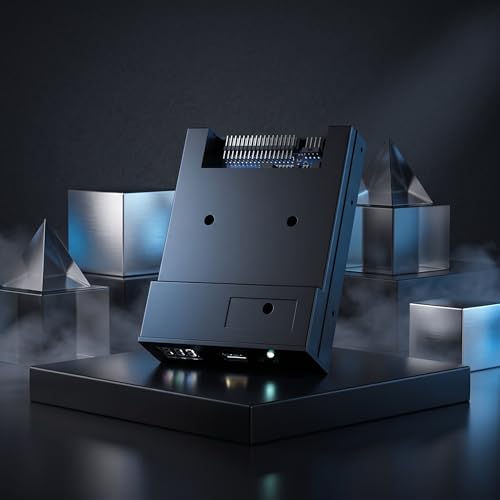
- Wide Compatibility: The unit has a standard 34 pin floppy drive interface. It operates on 5V DC power supply. Installation is straightforward with the included mounting screws.
- SFR1M44 U100K Updated Version: This model supports reading and writing data to USB flash drives. You can also format the virtual floppy disk when necessary. It works as a reliable floppy drive replacement.
- Plastic Construction: The emulator features a high quality plastic shell. It is lightweight and portable. The black color matches most computer cases and industrial panels.
| Memory Storage Capacity | 1.44 MB |
| Hardware Interface | USB |
| Additional Features | Lightweight |
| Write Speed | 500 kbps |
| Read Speed | 0.06 Megabytes Per Second |
| Connectivity Technology | USB |
| Flash Memory Type | USB |
| Hardware Connectivity Technology | USB Type A |
| Compatible Devices | Computers, laptops, and devices with USB adapters that support 3.5-inch floppy drives |
| Color | Black |
| Brand | GOTOTOP |
| Model Name | Sfr1m44-u100k |
| Manufacturer | GOTOTOP |
| UPC | 654936636330 |
| Mfr Part Number | Echo-013 |
| Model Number | 8541581142 |
| Special Feature | Lightweight |
| Item Weight | 1 lbs (450 grams) |
Who Should Buy?

-
Vintage Computer Enthusiasts
Ideal for users who restore and maintain older computers that require floppy disk compatibility for software or data transfer.
-
Data Preservation
Perfect for those who need to access, transfer, or preserve old files stored on floppy disks without hardware limitations.
-
Hobbyist Projects
Great for electronics enthusiasts and hobbyists working on retro computing projects that involve interfacing with modern USB drives.

-
Everyday Users
Not suitable for general users seeking a standard USB flash drive for everyday file storage and transfer needs.
-
High Capacity Needs
Users needing large storage capacities may find this emulator limiting as it only supports 1.44MB floppy disk emulation.
-
Speed Seekers
Not ideal for individuals needing fast data transfer speeds, as floppy disk emulation does not match modern standards.
Product Description
Have any Query? Chat with us
Customer Questions & Answers
-
Question:
What is the Floppy & Tape Drives-3.5 Sfr1m44-u100k Emulator?
Answer: The Floppy & Tape Drives-3.5 Sfr1m44-u100k Emulator is a USB flash disk emulation device designed to replace traditional 3.5-inch floppy disk drives. It allows users to access floppy disk images stored on a USB drive seamlessly. This updated version ensures compatibility with various vintage computers and systems, bridging the gap between old and new technology. It's particularly beneficial for enthusiasts wanting to preserve and access legacy data without the hassle of floppy disks. -
Question:
How do I install the Sfr1m44-u100k Floppy Drive Emulator?
Answer: Installing the Sfr1m44-u100k Floppy Drive Emulator is straightforward. First, ensure that your computer is powered off, then replace the existing floppy drive with the emulator using the included screws. Connect the power supply and data cable from your system to the emulator. Once installed, power on your computer, and you’ll find the emulator ready to read USB flash drive images, making it ideal for legacy systems that require floppy drive functionality. -
Question:
Can I use the Floppy Drive Emulator with any USB flash drive?
Answer: Yes, the Floppy Drive Emulator is compatible with most USB flash drives. You can use any FAT32 formatted USB flash drive to store floppy disk image files. This allows you to easily switch between different images without needing to swap out physical disks. Whether you're working with retro games or older software, this functionality enables a seamless experience, enhancing your ability to access various file types. -
Question:
What types of computers are compatible with the Sfr1m44-u100k Emulator?
Answer: The Sfr1m44-u100k Emulator is designed to be compatible with a variety of legacy computers that originally used 3.5-inch floppy disk drives. This includes models from brands like IBM, Compaq, and others that require such drives for data access. It's ideal for retro computing enthusiasts, software preservationists, or anyone needing to access old software stored on floppy disks. This versatility makes it a valuable tool for both personal and professional use. -
Question:
What formats of floppy disk images can the emulator support?
Answer: The Sfr1m44-u100k Floppy Drive Emulator supports a wide range of floppy disk image formats, such as .IMG, .DMK, and .DSK. This allows users to load various types of software ranging from games to utilitarian programs typically found on floppy disks. The ability to emulate different formats makes the device exceptionally versatile for collectors and hobbyists looking to resurrect vintage applications and experiences. -
Question:
How can I format my USB thumb drive for the emulator?
Answer: To format your USB thumb drive for compatibility with the Sfr1m44-u100k Emulator, you can use your computer's file management system. Connect the drive, then access its options and select 'Format'. Choose FAT32 as the file system, and ensure the quick format option is checked for efficiency. Once formatted, you can start loading floppy disk images onto the drive for use with the emulator, making it effortless to access multiple programs. -
Question:
What are the benefits of using a Floppy Disk Emulator?
Answer: Using a Floppy Disk Emulator like the Sfr1m44-u100k offers numerous benefits, such as convenience, storage capacity, and durability. It eliminates the need for physical floppy disks, which can degrade over time, and allows for easy management of multiple floppy disk images. This is particularly useful in situations where accessing and preserving old data is essential, enhancing the overall reliability and ease of use in retro computing environments. -
Question:
Is the Sfr1m44-u100k Emulator suitable for data backups?
Answer: Yes, the Sfr1m44-u100k Emulator is an excellent tool for data backups. By using a USB flash drive, you can create backups of your critical data that were previously stored on floppy disks without risking loss due to hardware failure. This versatility makes it a great solution for anyone looking to archive old files securely. It's particularly useful in labs or collections where preserving vintage software is crucial. -
Question:
How do I troubleshoot issues with the Floppy Drive Emulator?
Answer: If you encounter issues with the Sfr1m44-u100k Floppy Drive Emulator, first check all connections to ensure they are secure. Make sure the USB drive is correctly formatted and contains compatible floppy disk images. If problems persist, consult the user manual for specific troubleshooting tips, or check online communities for advice from other users. This proactive approach can help resolve common issues effectively. -
Question:
Where can I buy the Sfr1m44-u100k Emulator?
Answer: You can purchase the Sfr1m44-u100k Floppy Drive Emulator through Ubuy in Sri Lanka. Ubuy offers a convenient platform for finding this emulator along with various related products. With competitive pricing and a user-friendly interface, Ubuy is an excellent choice for acquiring tech products quickly and efficiently.
GOTOTOP Floppy & Tape Drives 8541581142 Editorial Review


The product is a Floppy Disk Emulator, which replaces older 3.5-inch floppy drives. It is compatible with a range of devices that use a floppy disk drive, including older gaming PCs, embroidery machines, and CNC milling machines. Customers found the device to be straightforward to install, with minimal software setup required. The product offers several modes, including disk image mode and file mode, and customers found it to be reliable in use. However, some customers found the device challenging to set up, and others found the product to be unusable with their hardware. The product arrived without any documentation, which several customers found frustrating. Some customers also noted that the device is only suitable for experts, and it requires some technical knowledge to set up properly. Overall, if set up correctly, customers found the product to be reliable and useful, allowing them to use older hardware without the need for floppy disks.
Customer Reviews & Ratings
140 customers ratings
-
5 Star
61%
-
4 Star
19%
-
3 Star
9%
-
2 Star
3%
-
1 Star
8%
Review this product
Share your thoughts with other customers
Pros
- Straightforward to install
- Reliable in use
- Several modes available
- Replaces outdated hardware
Cons
- Challenging to set up for some
Product Price History
Important information
- Limitations : For products shipped internationally, please note that any manufacturer warranty may not be valid; manufacturer service options may not be available; product manuals, instructions, and safety warnings may not be in destination country languages; the products (and accompanying materials) may not be designed in accordance with destination country standards, specifications, and labeling requirements; and the products may not conform to destination country voltage and other electrical standards (requiring use of an adapter or converter if appropriate). The recipient is responsible for assuring that the product can be lawfully imported to the destination country. When ordering from Ubuy or its affiliates, the recipient is the importer of record and must comply with all laws and regulations of the destination country.
- Not all the products listed on Ubuy are for sale, as Ubuy is a global search engine. Products are subject to export/trade regulations.
LKR 16643
Order now and get it around Thursday, June 25
This item is not restrict in my country.(Please click on above link if this item is not restrict in your country, So our team will review and allow.)
QTY:
Only 14 items left in stock.
Secured transaction
Ubuy works hard to protect your security and privacy. Our advanced payment security system ensures confidentiality by encrypting your information during transmission using AES (Advanced Encryption Standards) and SSL (Secure Socket Layer) protocols. Your payment details are 100% secure as we do not share your payment details with third party sellers.
Our Top Logistics Partners
Fastest cross-border delivery
Features & Benefits
- Use normal usb flash drive as the medium for transfer design
- No additional driver required, power directly from the USB port
- Compatible with USB34pin floppy driver interface, 5V DC power supply
- Easy to install
- Read and store data on floppy disk, and format if necessary
- High-quality plastic shell, light, durable, and easy to carry