- Home Page /
- Electronics /
- Computer Accessories /
- Computer Components /
- Computer Internal Components /
- I/O Port Cards /
- USB Port Cards /
- PCIE X4 to 2X 10Gbps Max Speed USB 3.1 GEN2 T...
0 ratings

Item #:
40185689
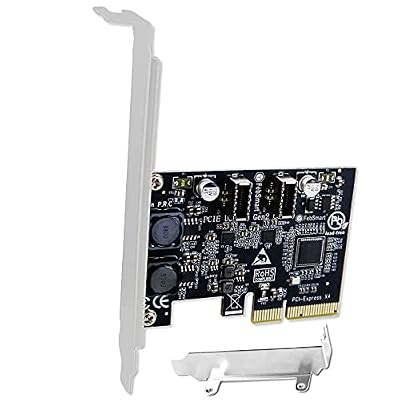
PCIE X4 to 2X 10Gbps Max Speed USB 3.1 GEN2 Type E Key A Ports Card, USB 3.1 GEN2 10Gbps Header for Desktop PCs Front Panel USB-C Ports, Built in
Item #:
40185689
LKR 16140
Price Details
Excluding Shipping & Custom charges ( Shipping and custom charges will be calculated on checkout )
*All items will import from US
0 ratings
Write a review
Out of stock
 Imported from USA store
Secured transaction
Ubuy works hard to protect your security and privacy. Our advanced payment security system ensures confidentiality by encrypting your information during transmission using AES (Advanced Encryption Standards) and SSL (Secure Socket Layer) protocols. Your payment details are 100% secure as we do not share your payment details with third party sellers.
Our Top Logistics Partners


FebSmart FS-E2C-Pro will allow users add 2X USB 3.1 GEN2 type E key A ports on desktop PCs

Fast
Shipping

Free
Return*

Secure Packaging

100% Original Products

PCI DSS Compliance

ISO 27001 Certified


Note: Step Down Voltage Transformer required for using electronics products of US store (110-120). Recommended power converters Buy Now.


What Stands Out
High-Speed Connectivity
Supports up to 10Gbps speeds with USB 3.1 GEN2, allowing for lightning-fast data transfers, ideal for professionals and gamers requiring efficient performance in desktop setups.
Dual USB-C Ports
Equipped with two Type E Key A ports, this card expands your desktop's connectivity options, making it perfect for modern peripherals and enhancing overall functionality.
Self-Powered Design
The built-in self-powered technology ensures reliable operation without draining your system’s resources, providing stability and performance for demanding tasks and peripherals.
Product Details
| Brand | FebSmart |
| Model Number | FS-E2C-Pro |
| UPC | 710964431160 |
| Manufacturer | FebSmart Co,.Ltd |
| Item Type Name | PCIE X4 Interface to 2X 10Gbps USB 3.1 GEN2 Type E Key A Ports Expansion Card |
| Hardware Interface | PCIE x 4 |
| Compatible Devices | Desktop PCs, Working Stations, MAC Pros |
| Operating System | Windows 11, Windows 7 |
| Item Weight | 82 Grams |
| Style Name | FS-E2C-Pro |
| Style | FS-E2C-Pro |
Who Should Buy?

-
Power Users
Ideal for gamers and professionals needing high speed USB connectivity for maximum performance in data transfer and gaming.
-
Content Creators
Perfect for video editors and designers requiring fast file transfers from external devices like cameras and storage drives.
-
Upgrading PCs
Great option for users wanting to upgrade older desktops with modern USB-C ports for enhanced connectivity.

-
Casual Users
Not necessary for casual users who do not require high-speed data transfer for everyday tasks like browsing.
-
Laptops Only
Unsuitable for laptop users since it is designed specifically for desktop PCs with PCIe slots.
-
Budget Consumers
May not fit budget-conscious consumers who prefer simpler, low-cost USB options without advanced features.
Product Description
PCIE X4 to 2X 10Gbps Max Speed USB 3.1 GEN2 Type E Key A Ports Card, USB 3.1 GEN2 10Gbps Header for Desktop PCs Front Panel USB-C Ports, Built in Self-Powered Technology FS-E2C-Pro
Have any Query? Chat with us
Customer Questions & Answers
-
Question:
What is a PCIe X4 to 2X USB 3.1 Gen 2 card, and what are its main features?
Answer: A PCIe X4 to 2X USB 3.1 Gen 2 card is designed to expand your desktop PC's connectivity options by adding two USB 3.1 Gen 2 Type E Key A ports. Its main features include support for high-speed data transfer rates up to 10Gbps, compatibility with multiple devices, and enhanced performance for data-intensive applications. This card is particularly useful for users who need to connect external drives, docking stations, or high-speed peripherals, allowing for smooth video editing, quick file transfers, and seamless multitasking. -
Question:
How does USB 3.1 Gen 2 differ from previous USB versions?
Answer: USB 3.1 Gen 2 offers double the bandwidth compared to USB 3.0, providing a maximum speed of 10Gbps. This is achieved through improved data encoding methods and enhanced hardware capabilities. Users will experience faster file transfers, reduced latency, and improved energy efficiency, making it ideal for modern devices like external SSDs and 4K video interfaces. This technology is essential for gamers and professionals who rely on rapid data access and transfer, enhancing overall system performance. -
Question:
Is this card compatible with my desktop PC?
Answer: This PCIe X4 to 2X USB 3.1 Gen 2 card is designed for standard desktop PC motherboards with at least one available PCIe x4 slot. You should verify compatibility by checking your motherboard specifications. Installation requires basic knowledge of hardware, as you will need to insert the card into the slot and connect it to the power supply. Once set up, the card allows you to utilize high-speed USB-C ports for various peripherals, enhancing functionality and convenience for your computing tasks. -
Question:
What types of devices can I connect to the USB Type-C ports?
Answer: The USB Type-C ports supported by this card can connect a wide range of devices such as external hard drives, USB flash drives, smartphones, docking stations, and peripherals like webcams or sound cards. Devices that support USB 3.1 Gen 2 will benefit the most from this configuration, enabling rapid data transfer. This flexibility makes it an excellent choice for creators, gamers, and professionals who require versatile connectivity to maximize productivity and ensure efficient workflow. -
Question:
Can I use this card to charge devices via USB-C?
Answer: Yes, this PCIe card supports USB Power Delivery through the Type-C ports, allowing you to charge compatible devices while transferring data. The power delivery feature facilitates faster charging for smartphones and other devices, enhancing productivity. This is particularly beneficial for users who need to keep their devices charged during intensive tasks such as gaming or video editing, adding great functionality to your setup by minimizing downtime. -
Question:
Do I need additional drivers for the installation of this card?
Answer: Typically, this PCIe X4 to 2X USB 3.1 Gen 2 card is designed to be plug-and-play with most modern desktop operating systems, automatically installing necessary drivers upon detection. However, it’s wise to check the manufacturer's website for any specific drivers or updates that might enhance performance. For users relying on specialized applications or advanced setups, having the latest drivers ensures optimal functionality and compatibility with various external devices. -
Question:
How will installing this card enhance my computing experience?
Answer: Installing a PCIe X4 to 2X USB 3.1 Gen 2 card significantly enhances the computing experience by increasing the number of available high-speed ports, facilitating faster data transfer and improved connectivity. Users can connect multiple devices simultaneously without sacrificing speed. This is especially advantageous for creators, gamers, and businesses leveraging high-definition graphics, extensive file manipulation, or multitasking across various peripherals, ensuring a more seamless and efficient workflow. -
Question:
What is the maximum length of USB-C cables I can use with this card for optimal performance?
Answer: For optimal performance with USB 3.1 Gen 2, it’s recommended to use cables that are no longer than three meters (approximately 9.8 feet). Using longer cables can lead to signal degradation and reduced speeds. If you need to distance your devices, consider high-quality cables that maintain the specifications required by USB 3.1. This ensures you maximize your data transfer rates, keeping your connections reliable whether for work, gaming, or multimedia applications. -
Question:
Where can I buy the PCIe X4 to 2X 10Gbps Max Speed USB 3.1 Gen 2 card in Sri Lanka?
Answer: You can purchase the PCIe X4 to 2X 10Gbps Max Speed USB 3.1 Gen 2 card from Ubuy, where you can find a wide range of electronic products available for delivery across Sri Lanka. Ubuy provides a streamlined shopping experience with access to various models and brands, making it easy to find the right PCIe card that meets your needs for enhanced connectivity and performance.
FebSmart USB Port Cards FS-E2C-Pro Editorial Review
The FebSmart PCIE X4 to 2X 10Gbps Max Speed USB 3.1 GEN2 Type E Key A Ports Card exceeded the expectation of one customer who had a bad experience with a similar product from a different vendor. The package is professional and includes a quick setup manual. The device is automatically recognised when the PC wakes up from sleep and charging speed is fast. Transfer speeds range from 150 to 500 MB/s with an average of 300-400 MB/s for the SSD driver with max transfer rate of 500 MB. Another customer purchased the card to leverage the high-speed USB-C ports on their case and was pleased that it does just what they needed. The only downside is that doing multiple high-speed transfers at once can max out the PCIe x4 bandwidth and cause peripherals to suffer and lag. Overall, the FebSmart PCIE X4 to 2X 10Gbps Max Speed USB 3.1 GEN2 Type E Key A Ports Card is highly recommended.
Customer Reviews & Ratings
1 customers ratings
-
5 Star
0%
-
4 Star
100%
-
3 Star
0%
-
2 Star
0%
-
1 Star
0%
Review this product
Share your thoughts with other customers
Pros
- Exceeds expectations
- Professional packaging and quick setup manual included
- Automatically recognises device when PC wakes up from sleep
- Fast charging speed
- Average transfer speed of 300-400 MB/s for SSD driver
- Allows high-speed USB-C ports to be leveraged
Cons
- Multiple high-speed transfers at once can max out the PCIe x4 bandwidth and cause peripherals to suffer and lag.
Product Price History
Important information
- Limitations : For products shipped internationally, please note that any manufacturer warranty may not be valid; manufacturer service options may not be available; product manuals, instructions, and safety warnings may not be in destination country languages; the products (and accompanying materials) may not be designed in accordance with destination country standards, specifications, and labeling requirements; and the products may not conform to destination country voltage and other electrical standards (requiring use of an adapter or converter if appropriate). The recipient is responsible for assuring that the product can be lawfully imported to the destination country. When ordering from Ubuy or its affiliates, the recipient is the importer of record and must comply with all laws and regulations of the destination country.
- Not all the products listed on Ubuy are for sale, as Ubuy is a global search engine. Products are subject to export/trade regulations.
LKR 16140
Currently unavailable.
We don't know when or if this item will be back in stock.
This item is not restrict in my country.(Please click on above link if this item is not restrict in your country, So our team will review and allow.)
Secured transaction
Ubuy works hard to protect your security and privacy. Our advanced payment security system ensures confidentiality by encrypting your information during transmission using AES (Advanced Encryption Standards) and SSL (Secure Socket Layer) protocols. Your payment details are 100% secure as we do not share your payment details with third party sellers.
Our Top Logistics Partners
Fastest cross-border delivery
Features & Benefits
- Adds 2X USB 3.1 GEN2 ports to desktop PCs
- Provides 10Gbps max data transfer rate
- Includes built-in self-powered technology
- Compatible with Windows, MAC, and Linux systems
- Not compatible with PCIE X1 or X2 slots
- Requires a PCIE X16 slot on the PC