- Home Page /
- Office Products /
- Office Electronics /
- Printers & Accessories /
- Computer Printers /
- Brother Professional Laser Printer with Scann...
0 ratings








Item #:
90677521
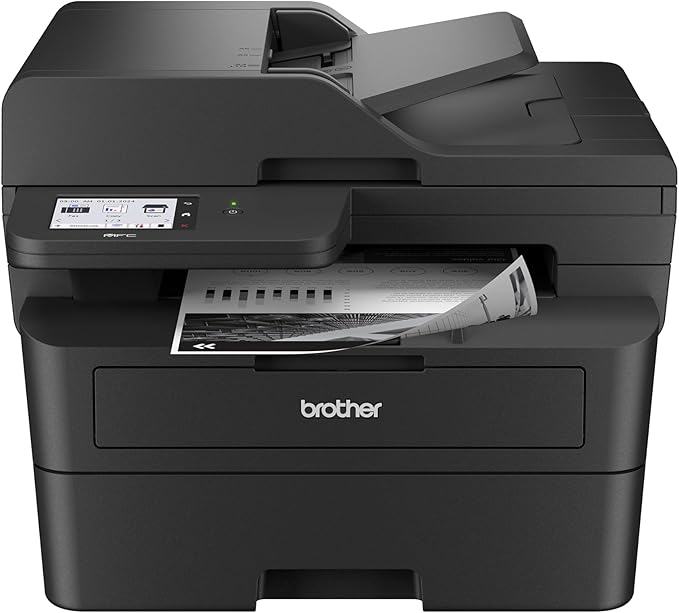
Brother Professional Laser Printer with Scanner, High-Speed 36 ppm Monochrome All-in-One, Wireless Duplex Printing and Scanning, Cloud-Ready 3.5 in
90% of respondents would recommend this to a friend
 1 Sustainability Highlights
Item #:
90677521
LKR 134500
Price Details
Excluding Shipping & Custom charges ( Shipping and custom charges will be calculated on checkout )
*All items will import from US
In stock
 Imported from USA store
QTY:
Only 10 items left in stock.
Order now and get it around Tuesday, September 15
Secured transaction
Ubuy works hard to protect your security and privacy. Our advanced payment security system ensures confidentiality by encrypting your information during transmission using AES (Advanced Encryption Standards) and SSL (Secure Socket Layer) protocols. Your payment details are 100% secure as we do not share your payment details with third party sellers.
Our Top Logistics Partners


An efficient, time-saving addition to any workspace, this multi-function wireless office printer combines four critical business functions in one compact footprint.

Fast
Shipping

Free
Return*

Secure Packaging

100% Original Products

PCI DSS Compliance

ISO 27001 Certified



Note: Step Down Voltage Transformer required for using electronics products of US store (110-120). Recommended power converters Buy Now.


What Stands Out
Wireless Connectivity
Seamlessly connect the printer to your Wi-Fi network for wireless printing from computers and mobile devices, providing convenience for home and office environments.
Duplex Functionality
Efficiently print, copy, and scan double-sided documents, saving both time and paper while reducing operational costs for users.
Refresh Subscription Trial
Enjoy a trial of the Refresh Subscription service that automatically orders toner when low, ensuring uninterrupted printing and reducing the hassle of supplies management.
Product Details
| Printer Type | Laser |
| Other Special Features of the Product | Auto Document Feeder, Energy Star, Epeat Qualified, Single Pass Duplex Copy and Scan, Touch Screen |
| Printer Output Type | Monochrome |
| Item Weight | 11.8 kg |
| Item Dimensions D x W x H | 16.1"D x 12.5"W x 16.6"H (40.9 x 31.8 x 42.2 cm) |
| Controller Type | Android |
| Print media | Paper (plain) |
| Scanner Type | Flatbed |
| Compatible Devices | IPhone, Laptops, PC, Smartphones, Tablets |
| Maximum Copies Per Run | 250 |
| Ink Color | Black |
| Additional Printer Functions | All In One, Copy, Scan |
| Control Method | Touch |
| Compatible Cartridge | TN830, TN830XL, TN830V |
| Number of Trays | 1 |
| Processor Count | 1 |
| Display Type | LCD |
| Resolution | 1200 x 1200 |
| Maximum Media Size | 8.5 x 14 inch (21.6 cm) |
| Maximum Sheet Capacity | 250 |
| Paper Size | 8.5X14 inches (21.6 cm) |
| Maximum print Resolution Color | 1200 x 1200 dpi dots_per_inch (3048 cm) |
| Maximum Print Resolution Black and White | 1200 x 1200 dpi dots_per_inch (3048 cm) |
| Duplex | Automatic |
| Maximum Copy Resolution Color | 600 x 600 dpi |
| Maximum Copy Resolution Black and White | 600 x 600 dpi |
| Brand | Brother |
| Model Name | MFCL2900DW |
| Model Number | MFCL2900DW |
| Built-In Media | AC Power Cord and Telephone Line Cord, DR830 Drum Unit (15,000 pages), MFC-L2900DW Printer, Product Safety Guide, Reference Guide, Warranty Card, Quick Setup Guide, Starter Black Toner Cartridge (700 pages) |
| Series Number | 2900 |
| Model Series | MFC-L |
| UPC | 012502674085 |
| Unit Count | 1 Count |
| Global Trade Identification Number | 00012502674085 |
| Item Type Name | Multifunction Printer |
| Manufacturer | Brother |
| Color Pages per Minute | 1 pages_per_minute |
| B&W Pages per Minute | 36 pages_per_minute |
| Initial Page Print Time | 6.9 seconds |
| Color | Black |
| Color Depth | 1 bpp |
| Printer Connectivity Type | Ethernet, USB, Wi-Fi |
| Hardware Interface | Ethernet, USB 2.0 |
| Number of Ethernet Ports | 1 |
| Total USB 2.0 Ports | 1 |
| Total Usb Ports | 1 |
| Connectivity Technology | Ethernet, USB, Wi-Fi |
| Printing Technology | Laser |
| Special Feature | Auto Document Feeder, Energy Star, Epeat Qualified, Single Pass Duplex Copy and Scan, Touch Screen |
| Printer Output | Monochrome |
| Maximum Print Speed (Color) | 1 pages_per_minute |
| Max Printspeed Monochrome | 36 pages_per_minute |
What's in the box
MFC-L2900DW Printer
Starter Black Toner Cartridge (700 pages)
DR830 Drum Unit (15,000 pages)
AC Power Cord and Telephone Line Cord
Product Safety Guide, Reference Guide, Warranty Card, Quick Setup Guide
Who Should Buy?

-
Home Offices
Ideal for home office users needing reliable printing, scanning, and faxing capabilities in a compact design.
-
Small Businesses
Great for small businesses that require high-quality monochrome printing without large bulk, enhancing productivity.
-
Budget-Conscious Users
Perfect for users looking for cost-effective printing solutions, offering low running costs with a subscription model.

-
Photo Printing
Not suitable for users needing high-quality color prints, as this printer only supports monochrome printing.
Product Description
Sustainability Highlights
This product has sustainability features recognized by trusted certifications.
Energy efficiency
Conserves energy compared to similar products. As certified by
Products that earn the U.S. Environmental Protection Agency’s ENERGY STAR label are independently certified to use less energy than standard models, reducing carbon pollution associated with energy generation and lowering your energy bill. For more information, visit energystar.gov. Learn more about this certification
Have any Query? Chat with us
Customer Questions & Answers
-
Question:
What are the key features of the Brother Professional Laser Printer with Scanner?
Answer: The Brother Professional Laser Printer offers several key features that enhance productivity and efficiency. It boasts a high-speed printing capability of 36 pages per minute (ppm) in monochrome, which is ideal for business environments. It includes wireless duplex printing, allowing users to print on both sides of the paper automatically, thus reducing paper usage. Additionally, it has a built-in scanner for convenient document digitization and cloud-ready connectivity, enabling direct access to files stored in cloud services. These features make it an excellent choice for seamless professional use. -
Question:
Is the Brother Professional Laser Printer suitable for a home office?
Answer: Yes, the Brother Professional Laser Printer is highly suitable for a home office. Its fast printing speed and versatile functions like scanning and duplex printing cater to the needs of remote workers. Furthermore, its compact design ensures that it fits comfortably on your desk without taking too much space. Home office users will benefit from the convenience of wireless connectivity, allowing them to print from various devices, including smartphones and tablets, thus streamlining their workflow effectively. -
Question:
How do I connect the Brother Laser Printer to my wireless network?
Answer: Connecting the Brother Laser Printer to your wireless network is a straightforward process. First, ensure that the printer is powered on and go to the printer settings menu. Select the 'Network' option, followed by 'Wireless Setup Wizard.' The printer will then search for available networks; simply choose your Wi-Fi network and enter the password when prompted. This wireless setup allows multiple devices to connect to the printer seamlessly, making it convenient for shared office environments or homes with several users. -
Question:
What type of toner does the Brother Professional Laser Printer use?
Answer: The Brother Professional Laser Printer utilizes high-yield toner cartridges designed for efficiency and high-quality output. These cartridges are specifically engineered to produce sharp text and clear images, contributing to the printer's professional performance. Using Brother’s Genuine Toner ensures optimal printer functionality and longevity. For busy offices, opting for high-yield options reduces the frequency of cartridge replacements, making it a cost-effective and time-saving choice in a professional setting. -
Question:
Can I print from my mobile device with the Brother Professional Laser Printer?
Answer: Absolutely! The Brother Professional Laser Printer supports mobile printing through various applications, such as Brother iPrint&Scan, Google Cloud Print, and Apple AirPrint. Users can easily send documents to the printer directly from their smartphones or tablets, enhancing convenience and flexibility. This feature is particularly useful for on-the-go professionals who need to print documents quickly without the hassle of connecting through a computer, allowing for a seamless workflow in today's mobile work environments. -
Question:
Does the Brother Printer support cloud printing?
Answer: Yes, the Brother Professional Laser Printer is cloud-ready, allowing users to print documents directly from popular cloud services such as Google Drive, Dropbox, and OneDrive. This feature eliminates the need for intermediate steps of downloading files onto your computer first, streamlining the printing process, especially for digital nomads or professionals who work with cloud-based platforms. Users can access their documents from anywhere and print with ease, enhancing productivity for remote or flexible working arrangements. -
Question:
What kind of maintenance does the Brother Laser Printer require?
Answer: Maintaining the Brother Professional Laser Printer is relatively simple and requires basic care to ensure optimal performance. Periodically cleaning the printer, including the paper path and scanner glass, can prevent print quality issues. Additionally, replacing the toner cartridge when low or empty and checking for paper jams will help maintain its efficiency. Regularly updating the printer’s firmware can also enhance its functionality, ensuring you benefit from the latest features and security improvements, thereby extending the printer’s operational life. -
Question:
What sizes of paper can the Brother Laser Printer handle?
Answer: The Brother Professional Laser Printer can accommodate a variety of paper sizes, including the standard Letter (8.5 x 11 inches), Legal (8.5 x 14 inches), and A4 sizes, among others. It also supports custom paper sizes for specific printing tasks, making it versatile for different needs such as brochures and presentations. This flexibility is especially beneficial for businesses that require various print outputs without the need for multiple printers, ensuring all printing needs are met in one machine. -
Question:
What is duplex printing and how does it work in the Brother Printer?
Answer: Duplex printing refers to the capability of printing on both sides of the paper automatically. In the Brother Professional Laser Printer, this function is built-in, meaning it can seamlessly flip the paper internally to print on the reverse side. This feature is advantageous for reducing paper consumption and is an eco-friendly choice for organizations looking to minimize waste. Duplex printing is ideal for producing professional documents, reports, and presentations, allowing businesses to efficiently utilize resources. -
Question:
Where can I buy Brother Professional Laser Printer with Scanner in Sri Lanka?
Answer: You can purchase the Brother Professional Laser Printer with Scanner from Ubuy, which provides a reliable online shopping experience tailored to your needs in Sri Lanka. Ubuy offers a hassle-free purchasing process with user-friendly navigation through product categories. Customers can easily find special offers, product details, and reviews which help make informed purchasing decisions. Ubuy’s commitment to customer satisfaction ensures that you receive prompt assistance with any queries you may have during your purchase.
Brother Printers MFCL2900DW Editorial Review


Brother Professional Laser Printer with Scanner, High-Speed 36 ppm Monochrome All-in-One, Wireless Duplex Printing and Scanning, Cloud-Ready 3.5 in Touchscreen for Small Business (MFC-L2900DW) is a versatile solution ideal for small businesses. Users rave about its effortless wireless setup, allowing seamless printing and scanning from various devices. The printer's 36 pages per minute speed ensures efficiency, while the ability to scan both sides of a page in a single pass adds convenience. With features like Air Print compatibility and a robust touchscreen interface, this model is not only user-friendly but also built for reliable performance. Users appreciate the option to skip any mandatory toner subscription, promoting flexibility in toner purchases.
Customer Reviews & Ratings
380 customers ratings
-
5 Star
72%
-
4 Star
9%
-
3 Star
3%
-
2 Star
3%
-
1 Star
13%
Review this product
Share your thoughts with other customers
Pros
- Quick and easy setup process
- High-speed printing at 36 ppm
- Excellent scanning quality in black and white
- Compatible with multiple devices and apps
- Quiet operation during printing and scanning
- Durable construction typical of Brother products
Cons
- ADF may jam with slightly creased pages
Platform Trust & Buyer Confidence

JG
Jazz
Verified buyer
“Easy to use and always helpful and sorts any issues I've had past and present”
1 September 2026 · via Trustpilot
EK
Emmanuel
Verified buyer
“I always receive support when I engage customer service. Overall my experience with UBUY has been top notch. Keep up the good work.”
31 August 2026 · via Trustpilot
F
fnd
Verified buyer
“The delivery was fast and the product came undamaged and authentic.”
29 August 2026 · via Trustpilot
LC
Leana
Verified buyer
“Ubuy is extremely efficient and to order online is an easy process. The verity of products to buy is really unlimited! My order was urgent and I got it on time. The products are great! Thank you Ubuy!”
25 August 2026 · via Trustpilot
HL
Hengo
Verified buyer
“Fast, convenient and cheap. Great store!”
27 August 2026 · via Trustpilot
Secure Checkout
Global Delivery
Easy Returns
Genuine Products
Product Price History
Important information
- Limitations : For products shipped internationally, please note that any manufacturer warranty may not be valid; manufacturer service options may not be available; product manuals, instructions, and safety warnings may not be in destination country languages; the products (and accompanying materials) may not be designed in accordance with destination country standards, specifications, and labeling requirements; and the products may not conform to destination country voltage and other electrical standards (requiring use of an adapter or converter if appropriate). The recipient is responsible for assuring that the product can be lawfully imported to the destination country. When ordering from Ubuy or its affiliates, the recipient is the importer of record and must comply with all laws and regulations of the destination country.
- Not all the products listed on Ubuy are for sale, as Ubuy is a global search engine. Products are subject to export/trade regulations.
LKR 134500
Order now and get it around Tuesday, September 15
This item is not restrict in my country.(Please click on above link if this item is not restrict in your country, So our team will review and allow.)
QTY:
Only 10 items left in stock.
Secured transaction
PCI DSS compliant and ISO 27001:2022 certified, with encrypted payments and full buyer protection on every order.
Our Top Logistics Partners
Fastest cross-border delivery
Features & Benefits
- Multi-function printer: Prints, copies, scans, and faxes.
- High-speed: Prints up to 36 pages per minute.
- Time saver: Features automatic duplex scanning and a 50-page document feeder.
- Reduced electricity use: 22% more efficient fuser design.
- Compact design: Fits easily on any desktop.
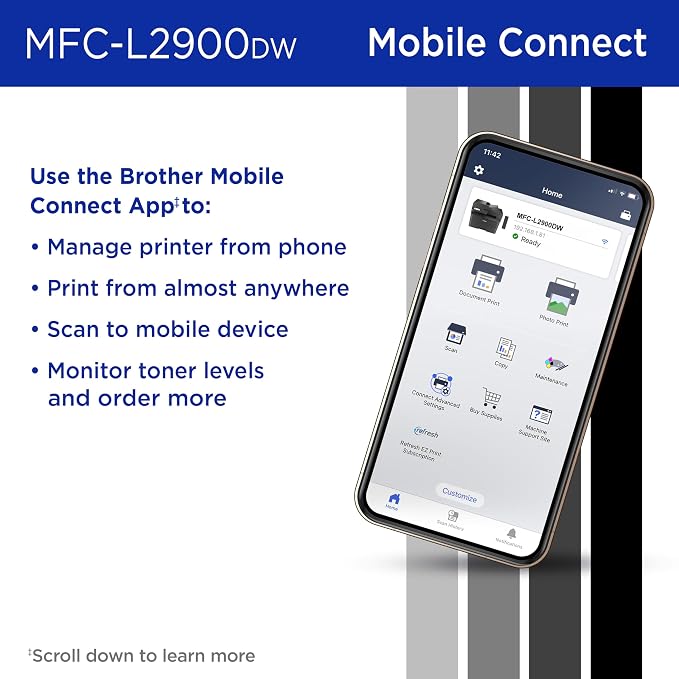
- Mobile connectivity: Remote printing via Brother Mobile Connect app.
Ubuy Assurance
Experience worry-free shopping with 100% original products, PCI DSS-compliant payment security, ISO 27001-certified data protection, the fastest cross-border delivery, free returns *, and secure packaging on every order.